
Changelog

What's new in AITEZA

New features, improvements and bug fixes of every version, newest first.

  1. v2.12.0

    Search everything at once, let AITEZA read large plans and drawings, and create documents in the design of your own files.

    New features

    • Search Everywhere

      One search finds datarooms, files and their contents, images, websites, your chats and your messages. Open it with Ctrl+K (⌘K on a Mac) or Search in the sidebar. Each result shows why it was found, and opening it highlights the matching passage.
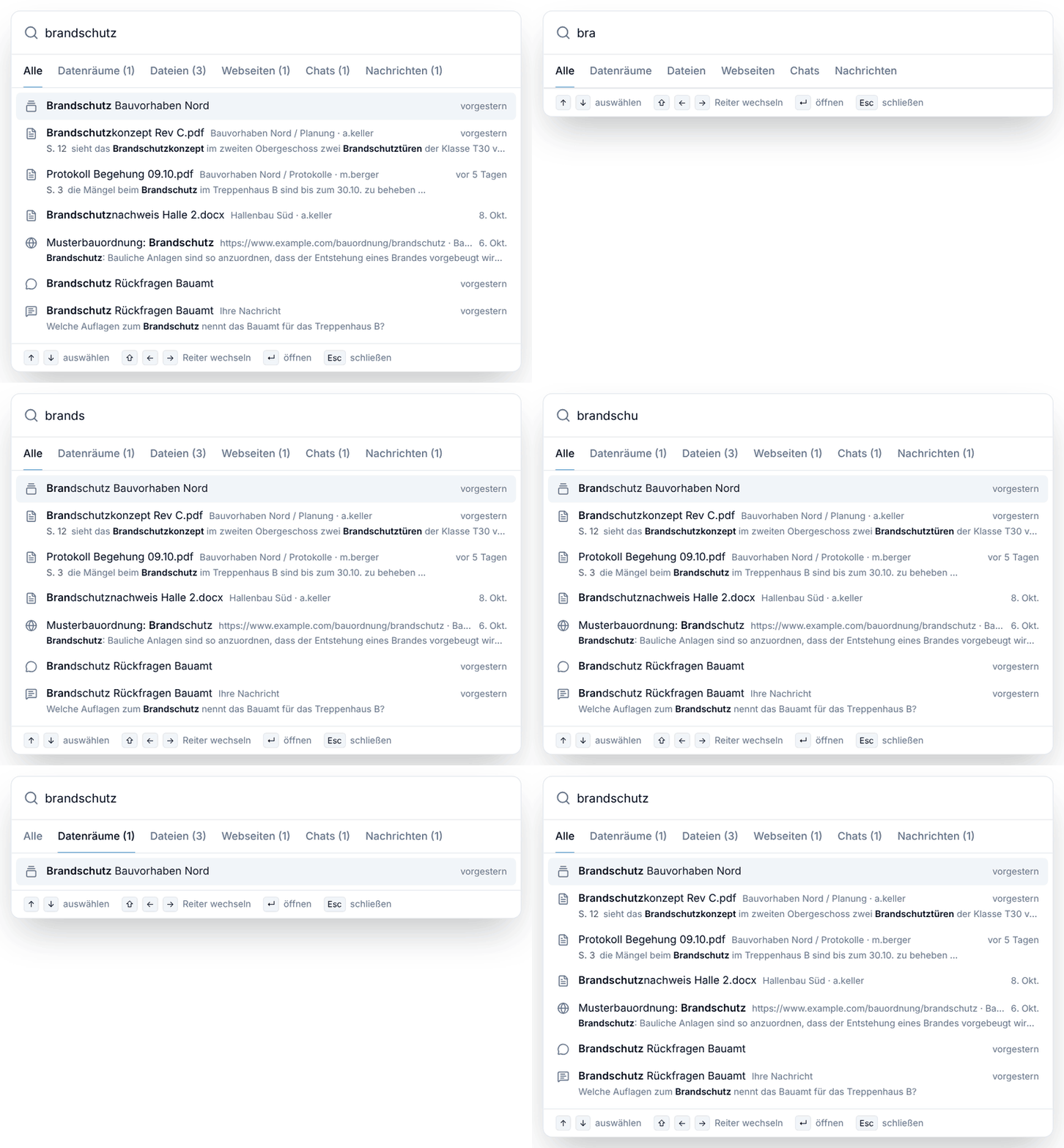
      Search Everywhere
    • Large Plans and Drawings

      AITEZA reads building plans and P&IDs region by region, so even small labels are read reliably. It looks up details, follows lines, counts and lists components, checks or summarizes whole drawings and compares two plans or revisions. A live view next to the chat shows the regions AITEZA looks at, its findings and the changes it found.
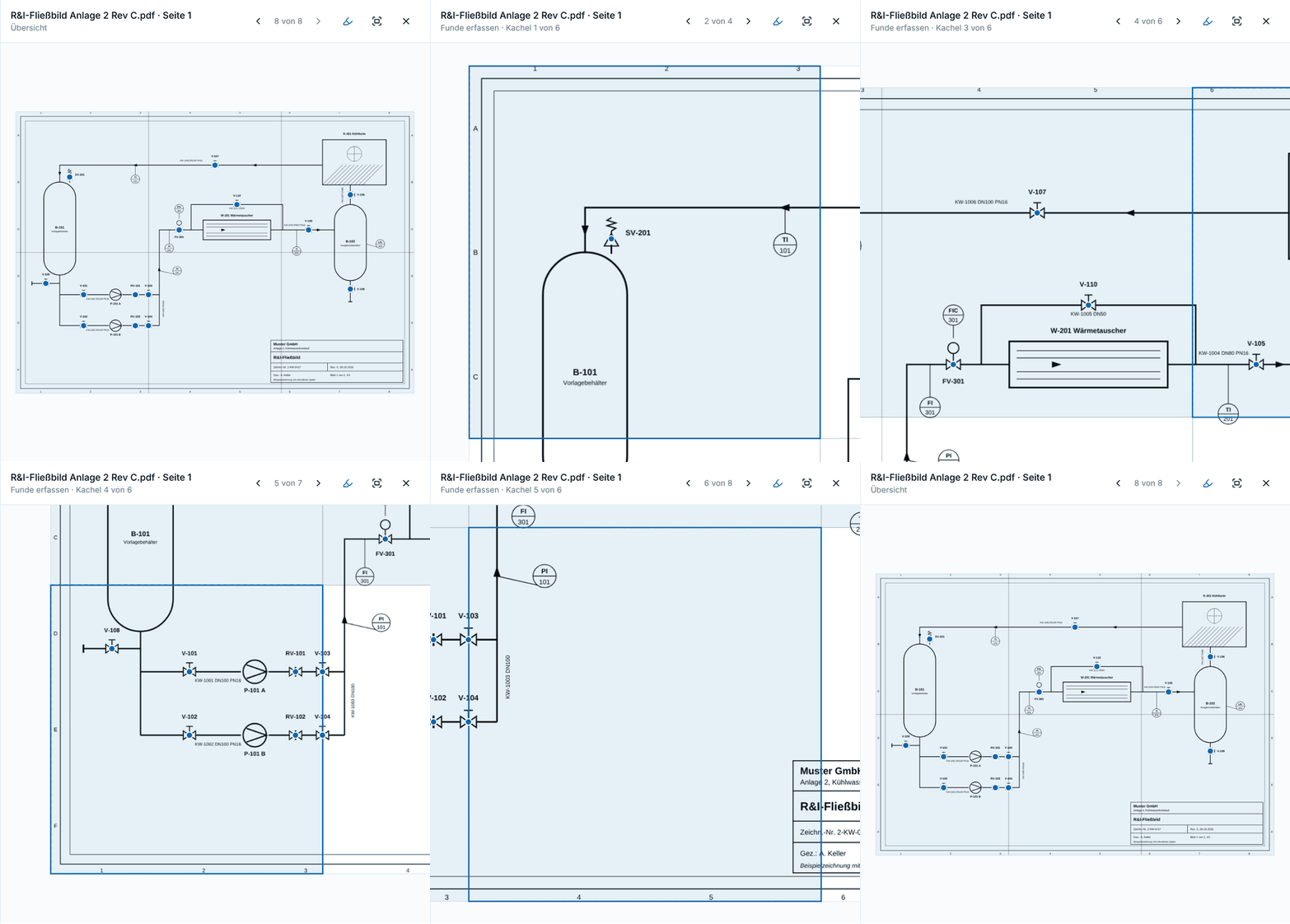
      Large Plans and Drawings
    • Documents in Your Design

      AITEZA writes new documents in the look of an existing file, for example on your letterhead, in your company template or in the design of a presentation, with any length, tables and images. Existing files can also be restructured, shortened or extended while keeping their design.
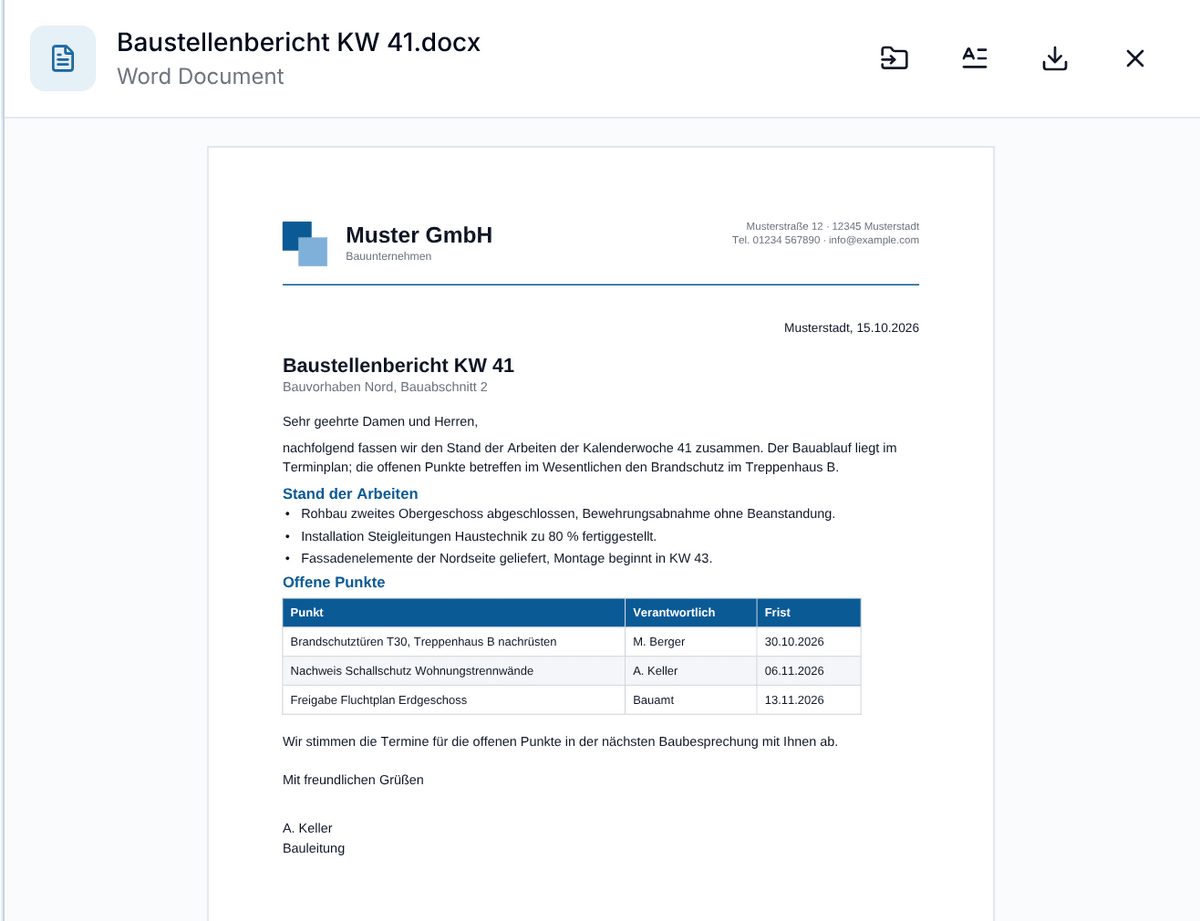
      Documents in Your Design
    • Images and PDF View for Generated Documents

      Generated presentations and reports can contain images from your attachments and datarooms. Generated documents open as a PDF in the preview, also while an existing file is being adapted.

    • Cloud Storage Sync

      Datarooms can stay in sync with a folder in OneDrive, SharePoint, Google Drive or Dropbox. New files are added, changed files get a new version and deleted files are removed. Available to organizations with the cloud storage add-on.

    • Questions from AITEZA

      When a request can be understood in different ways, AITEZA asks what you mean while it answers. If web search is switched off but an answer needs current information, AITEZA asks whether it may search the web for this answer or for the rest of the chat.

    Improvements

    • Uploaded images, scans and drawings are turned upright automatically, and new images appear in the dataroom as soon as you upload them.

    • General performance improvements.

    Bug fixes

    • Fixed an issue where the chat moved up and could no longer be scrolled.

    • Files are processed more reliably while document processing is under heavy load.

    • General bug fixes.

  2. v2.10.0

    Version 2.10.0 introduces automatic model selection, integrations with external tools and the administration of your organization directly in AITEZA.

    New features

    • With the new Auto option, AITEZA selects a suitable model for each message. Simple questions are answered by a fast model, while analyses, code and long documents are handled by the most capable one. Images, web search and connected datarooms are only passed to models that support them. Below each answer you can see which model was selected and why.

    • The model selection now groups models by provider and shows for each model where it is operated (self-hosted, hosted in the EU without training on your data, or through an external provider), how it compares in reasoning depth, speed and cost, and what it costs to use.

    • AITEZA can now be connected to external systems such as Microsoft 365, Google Workspace, Jira, Confluence, Notion or Slack. Organization admins approve the available integrations, and each person connects with their own account and decides per message which integrations may be used. Before an integration changes data, AITEZA asks for your confirmation.

    • Audio recordings in datarooms (MP3, WAV, FLAC, AAC) are now transcribed automatically and can be searched like documents. The transcript view includes a player, timestamps, named speakers, a search function and the option to correct the text. Sources in chat answers lead directly to the quoted passage.

    • Answers are now generated on the server. If you close the tab, lose the connection or switch devices, the answer is still completed and saved, and you can follow its progress when you return.

    • The new Settings area in the profile menu brings together your account, your preferences such as language, appearance, default model and document styles, and an overview of your monthly AI costs including a forecast to the end of the month.

    • Organization admins can now invite and manage people, organize groups, choose the AI models available in their organization, view usage and costs per person and model, and search the audit log. All of this is done directly in AITEZA, and the data can be exported as CSV.

    • Admin rights can be granted for the entire organization or for individual groups and limited to specific areas such as usage, people, audit log or member management. This allows departments to manage their own groups. Every change is recorded in the audit log.

    • People with the corresponding role can create personal API keys to use AITEZA and its AI models in their own scripts and applications, within the limits set by their organization.

    • Each dataroom now has a change history that shows which files were uploaded, replaced, deleted or moved, by whom and when. Sub-datarooms are included.

    • Generated Word, Excel and PowerPoint files have a clearer design and follow your organization's document style. Excel files can contain working formulas, and follow-up requests update the same file as a new version. Existing PDF files can now be filled in, updated and translated while keeping their original layout.

    Improvements

    • The profile menu now contains a direct link to the documentation.

    • General performance improvements.

    Bug fixes

    • OpenDocument files (ODT, ODS, ODP) in datarooms are processed again and can be searched.

    • Large files are processed reliably again.

    • General bug fixes.

  3. v2.9.0

    Save, share, and reuse your best prompts in the new Prompt Library.

    New features

    • Prompt Library

      A new page in AITEZA where prompts can be saved for reuse. Each prompt has a simple title, a short description of what it is used for, and the actual prompt text. Prompts can be categorized with tags, bookmarked for quick access, and shared with specific users or the entire organization like datarooms.

    • Prompt Library

      A new page in AITEZA where prompts can be saved for reuse. Each prompt has a simple title, a short description of what it is used for, and the actual prompt text. Prompts can be categorized with tags, bookmarked for quick access, and shared with specific users or the entire organization like datarooms.

    • Image Extraction from Documents

      Images are now extracted from documents and available in the Images tab like other images and graphics, and on request AITEZA can also include images in its answers.

    Improvements

    • General performance improvements.

    Bug fixes

    • General bug fixes.

  4. v2.8.0

    Edit text in existing Office files

    New features

    • Edit Existing Office Files

      Attach or select a .docx, .pptx, or .xlsx file up to approximately 25 MB and ask AITEZA to update existing text or values, for example to fill in a Word form, translate a presentation, update a spreadsheet, or reword a report. You receive a new copy while design, formatting, images, and layout remain unchanged; password-protected or macro-enabled files, added or removed sections, slides, or rows, and complex form controls are not supported.

    • Optimized PDF Analysis

      A fourth processing pipeline creates a new PDF export with cleaned metadata before visual analysis, providing the highest compatibility for files with invalid or problematic structures.

    • Save Generated Files from the Artifact Viewer

      A new button in the Artifact Viewer lets you add a generated file directly to a dataroom without downloading and uploading it again.

    Bug fixes

    • General performance improvements and bug fixes.

  5. v2.7.0

    Spreadsheet analysis and previews for Office files.

    New features

    • Excel and CSV files can now be analyzed using exact data queries, enabling reliable sums, filters, groupings, averages, and comparisons. AITEZA automatically translates your questions into suitable queries, so no SQL knowledge is required.

    • Word, Excel, PowerPoint, and supported OpenDocument files can now be opened directly as PDF previews without downloading them. Complex content or special formatting may differ from the original, which should be opened in the corresponding Office application for an exact view.

    • Guided tours now walk you step by step through navigation, chat, datarooms, and workflows, making it much easier for new users to get oriented. You can restart any tour at any time, and your progress is saved individually per user so you can pick up where you left off.

    • Users who belong to multiple tenants can now switch between them directly from the profile menu, without having to sign out and log in again, making it much faster to move between different work environments.

    • PDF files can now be uploaded in the Images tab as well. They are automatically split and processed page by page as individual images, so PDF content becomes usable wherever images are supported.

    • The upload function now supports additional archive formats, including TAR, 7Z, GZ, BZ2, and XZ, so more of the compressed files you already work with can be uploaded directly without needing to convert them first.

    • Copy and paste files, images, and screenshots directly from your clipboard when uploading them into a dataroom. This means you no longer need to save the content locally first or search for it in a file picker dialog; it simply appears wherever you paste it.

    Improvements

    • Hard-to-read and scanned documents are now processed more reliably. When the standard recognition method struggles to extract text, the system automatically falls back to an alternative recognition method, so more of your documents can be read and processed successfully.

    • General performance improvements.

    Bug fixes

    • Minor visual issues in the navigation bar have been fixed.

    • General bug fixes.

Loading older versions…

Weyer Data Engineering

A company of the

Ⓒ 2026 weyer data engineering